Showing posts with label Meyer. Show all posts

Tuesday, December 1, 2020

Teaching D-Mitri Remotely

Every fall, in our Digital Audio Systems class, I teach our first-year sound designers a two-week intensive overview on the Meyer Sound D-Mitri system.  D-Mitri is a powerful tool for live sound that combines the functions of a digital mixing console, a sound content playback device, a multi-channel sound spatialization tool, a room acoustics enhancement tool, and a show control hub all into one package.  D-Mitri systems are found in large scale sound installations around the world, from theme parks to Broadway to more.  The ubiquity and capabilities of D-Mitri are so large (as is the learning curve, frankly), that we typically have a number of second- and third-year students join us for the D-Mitri training to refresh their skills.

UCI has a small D-Mitri system, and we use it both as a teaching tool and in production.  When we teach with it, we roll the rack into the Meyer Sound Design Studio and patch eight D-Mitri outputs directly into our eight-channel loudspeaker system so that we can learn and work with it while experiencing its spatialization capabilities in real time.  D-Mitri programming happens through software called CueStation, which functions in a client-server capacity.  Multiple users can be logged into D-Mitri at the same time, each working on a different aspect of the programming.  Our D-Mitri classes typically involve everyone in the studio, sitting at their laptops, all wired into D-Mitri with a nest of ethernet cables.

The Meyer Sound Design Studio, in the before-times.


Of course, we can't do that this year.  We could have delayed the training module until we were able to meet safely, but I don't know when that will be, and I'm honestly tired of delaying things because of the freaking pandemic.  I didn't want to let the perfect be the enemy of the good, to paraphrase Voltaire.

So, in a pandemic, how do you teach a class that requires both client-server access AND the ability to perceive spatialized sound?  In order to solve this, I needed to think through a number of different challenges.  Here they are, how I thought through them, and how I eventually solved them.


Physical Locations

We knew that the D-Mitri rack would need to live in the Meyer Sound Design Studio.  The studio is currently cleared to be occupied by three people, but I was uncomfortable coming to campus for in-person class (I'm teaching all of my classes remotely this term).  Plus, I know how important the refresher is to our more senior students, and I didn't want to cut them out of the experience.  So, each student would be remote, logging in with their computers (with wired connections, preferably).  I came into the studio to teach the classes so that I could take care of any issues that came up while teaching that I couldn't deal with remotely.

Even though I'd be teaching from the studio, I expected that I'd need to be able to remote into the host computer in order to tweak details from home. Early in the quarter, while testing, I found that if I were on campus, I could screenshare with the host computer (an iMac that we call Chalkboard), but when I returned home, I couldn't screenshare with Chalkboard at all.  After consulting with our IT department, we determined that we needed a more robust screensharing tool.  We installed TeamViewer on Chalkboard so that I could control the host computer, restart failed connections, etc.  TeamViewer mostly worked like a champ, though there were a few times where I couldn't log on to Chalkboard at all. 


Connecting CueStation to D-Mitri

The easiest way to share a CueStation screen with the students was to just share my laptop's desktop via Zoom, but if I did that, they'd just be watching me click things, which is hardly useful when teaching a tool.  The students needed to be able to control CueStation on their own in order to get their (virtual) hands on the (virtual) machine.  I asked Richard Bugg with D-Mitri about how we might address this issue, and he noted that D-Mitri systems can be controlled from around the globe using a proxy server. The folks at D-Mitri use this feature to troubleshoot systems without having to fly halfway around the world, but it was just as useful for my needs.  Richard walked me through the steps to set it up and spent some time doing some testing with me. The proxy server required Chalkboard to be running CueStation, but as long as it was running CueStation and the proxy server was active, I could have up to eight clients logged in at the same time.  Sometimes it took a while to get all students onto the proxy server at the same time. The folks at Meyer use the proxy server to do maintenance on machines that are difficult to get to, not to teach D-Mitri to a class, so they don't typically have the user count that we did. 


Monitoring

So, we've figured out where everyone would be, and we figured out how everyone can control D-Mitri using a proxy server.  How can we send spatialized sound to the students so that they can all monitor the D-Mitri environment well?

My first thought was to build a SpaceMap (D-Mitri's spatialization tool) replica of the Meyer Sound Design Studio's loudspeaker configuration, take the eight outputs of D-Mitri into a DAW, place them into a 5.1 session, stream the six-channel output over the net, and then have students monitor with 5.1 headphones.  But, we ran into a number of challenges with this idea.  First, I couldn't find a reliable six-channel sample-accurate streaming tool.  We've been using AudioMovers, which does a great job with two-channel signals, but in testing, multiple two-channel instances did not sync to each other (there are rumors of a >2-channel upgrade, but I haven't tested it yet).  Also, six channels of audio is three times the bandwidth of two channels, which could impair networks in dorms and homes.  Finally, I was hoping to avoid having to seek out funds to buy enough 5.1 headphones to outfit the class.  So, back to the drawing board.

SpaceMap of the Meyer Sound Design Studio
A spacemap of the MSDS studio.


I solved my problem in the next iteration.  I still took the eight channels from D-Mitri in to my DAW, but instead of mixing to 5.1, I mixed to binaural.  I initially used Binauralizer by Noisemakers to render each D-Mitri input relative to the loudspeaker's position in the room, though I shifted to the dearVR Micro plug-in due to better low frequency management.  The DAW mixed all eight inputs together, and then I used AudioMovers to send a two-channel stream out to the students.  I cut the audio bandwidth by two-thirds and removed the need for 5.1 headphones!  

ProTools Session Set-Up
ProTools handled the binaural routing.


The eight iterations of NoiseMakers, positioned relative to their corresponding spatialization position.
Eight binauralization plug-ins spatialized the sound.


Ultimately, the students were able to listen to high-quality spatialized audio with a relatively low latency.  It wasn't the same as being in the room, but it was pretty close.


Returning to the Studio

We spent four two-hour sessions learning the basics (and some details) of D-Mitri remotely, and on the fifth and final day of the module, the two students and I met in person in the Meyer to review their work in person.  They had created a spatialized sonic event from their apartments, but they presented their work in person, through the eight-loudspeaker system that we have in the Meyer. This gave us an additional opportunity to discuss how well the binaural monitoring situation translated into actual meat-space monitoring.  Their work more or less translated well, but we note that monitoring a sound panned to the center of the room revealed itself differently in speakers than in headphones.  Via headphones, all eight ambisonic channels were being addressed, which imaged the sound to the center of our image. But in the studio, having all eight speakers firing didn't image to the center.  It either imaged EVERYWHERE (if you were sitting in the sweet spot in the room), or to whatever speaker you're closest to (if you're not in the sweet spot).  


Final Thoughts

You won't catch me yearning to do this again if I have the option to teach in person, but overall, I'm pleased with the results.  If I have to do this again, I'd need to address these issues:

  • Input source.  I was using a single channel of audio from ProTools as an input source.  I set ProTools to loop playback but sometimes the session would stop on its own.  Next time, I'd use a different, more reliable input source.  An FM radio would be a nice low-tech tool.
  • Remote Access via proxy server.  It wasn't as solid as I would have liked it to be.  In fact, on the first day of class, no one could connect except me.  
  • AudioMovers wasn't designed to stream audio 24/7 for 3 weeks, and it occasionally failed.  When that happened, I had to log into the computer, restart the transmission, and send the link around again.  I had to do that once a day or so.  Not a deal breaker.  Just a thing to note.

Overall, this was a huge success!  If you're thinking about doing something like this, let's talk!  I'd be happy to share my thoughts and brainstorm other/better solutions!

Sunday, January 19, 2020

Company

Lots of Company! Life is Company! Love is Company!

...Sondheim wrote a hell of a show in Company. The unique Sondheim harmonic structures, overlapping vocal lines, and thick orchestration do not escape this show. I have only had the privilege of designing a Sondheim show twice before (Gypsy and Into the Woods), so I was thrilled at the opportunity when I learned I was going to be designing Company as the season opener.

When I was thinking through an outline for my design process, there were a couple specific challenges to overcome and goals to meet.

First of all, the show was in the Irvine Barclay Theatre (IBT), which is a fantastic 750-seat proscenium theatre, and our usual venue for the season opening musical. However, as this venue is also its own business entity, we don't get to call the shots in the same way as we might in a UCI educational venue. We couldn't configure the equipment with as much flexibility. We had very strict hours during which we could work; being forced to leave the theatre at midnight during tech week is both a wonderful and terrible thing! And lastly, we didn't have free access to the venue until load-in, so a lot more guessing and relying on CAD drawings are necessary to put the design together before load in.

Secondly, some of my design goals caused some challenges around what gear our shop was able to supply. In a venue the size of the IBT, I wanted arrays, rather than point-source boxes, as my main system. And, being a musical theatre production, we used a left-center-right speaker position as is typical of most amplified musicals. Our main line array cabinet of choice at UCI is the Meyer M1D. We have 16 of these boxes, so I opted to use 8 per side for the L and R hangs. We were then fortunate to receive a little extra funding and rent the newer Meyer LINA system as the center hang (10 LINA cabinets).


My overarching goal of this design was to create a great sounding, reliable musical theatre system. Immersive audio and surround sound are hugely popular explorations in modern sound design, but for this show I wanted to instead focus that energy on perfecting the fundamentals. The show also did not call for a huge amount of additional sound content and effect. I added some NYC soundscapes from time to time, as well as a few incidentals where called for, but for the most part, anything more complex started to step on the score's toes.

The Barclay has a few in-house QSC KLA12 boxes per side, but given some of the restrictions mentioned above, we had much more control bringing in our own M1D arrays. Being able to rent the LINA array for the center vocal system meant that I had an amazing level of quality to work with. The groundplan, section, and array drawings show where I ended up with the system.


As you can see, the system also includes front fills, balcony fills, and "side fills," which were two Meyer UPJs hung immediately next to the LINA array, but focused toward the far outside sections of the orchestra level closer to the stage. This is the area the LINA didn't quite cover within a 6db tolerance. With those UPJs and the front fills (Meyer UPMs), the orchestra level had even coverage everywhere except for about 4-6 seats.
Arrays and front fills just after the truss went up.

In the last year, we have also acquired a slew of new equipment to fold into our designs. The main impetus was the old and decrepit nature of our former large-format mixing console. The Avid VENUE from years past was falling apart physically, and becoming quickly outdated as an educational tool. We're now using an Allen & Heath dLive system, consisting of the dLive DM48 MixRack with S7000 surface, and several digital snakes (DX32 and DX168) for expansion. This system finally allows enough I/O to handle most modern designs without restriction. The following shot of the tech table shows the control software for the dLive system. It also shows the Allen & Heath IP8, which is an amazingly versatile fader bank that gives me control of the system in a much more intuitive way without being at the console.


The wireless mics used on performers were the Shure UHF-R series that have been so ubiquitous in the last decade (or two...). We were able to use DPA 4061 microphone elements on all of the UR1 body packs, double miking our lead, "Bobby," since he is so rarely offstage. The fantastic A2 crew, trained by assistant sound designer Kyle Causey, was always keeping tabs on the status and performance of each mic, such that we didn't have any major incidents during the run of the show. They were using Wavetool, which is on the screen of the iPad in the previous picture. It's a software that combines the RF monitoring of Wireless Workbench with audio monitoring capabilities to let them look and listen for each microphone on a computer, iPad, or iPod Touch anywhere on the deck. This was our first show using Wavetool, and it proved to be an awesome update to the A2 workflow here!

Another purchase we've made in the last two years is Waves SoundGrid. This is an external FX processing server that loops into the console via an expansion card - it allows us to add any Waves plugins to the live effects chain in the console! In this case, I was able to use Waves plugins like their DeEsser, RVerb, TrueVerb, C6, and a few others to augment the limited processing the board can do. At the far end of the FOH table picture is the monitor with control software for SoundGrid. In front of the S7000 is our mixer/A1 JJ Margolis, who was thankfully able to put up with me during this whole process! The picture was candid for JJ but less so for Amin, our QLab operator.

The orchestra was the last major piece of the [sound] puzzle, and in this case, they were located on stage, between the NYC buildings and the actor platform. Having the new digital snakes with the Allen & Heath equipment made it so much easier to integrate the orchestra into the system. Because of the orchestra's location, there was a pretty large distance from them to the audience, so amplifying them and keeping their stage sound level under control was more manageable than I anticipated. The actors had the advantage of being closer to the orchestra at all times (though we still used a full stage monitor system). And, I actually found it much easier to get a consistent orchestra/vocal blend throughout the audience since the orchestra was not immediately in front of the front row! I didn't snap any up-close pictures of the orchestra, but this might give an idea of their relation to the audience:

I was lucky to have mixed the season opening musical the year prior, Legally Blonde, with Jack Bueermann as designer. That show was also in the Barclay, so I was able to get a grasp on how to work best in the space and what might work best when it came around to designing Company. Because of the extra obstacles that working in the Barclay introduces, I tried to be ahead of the game in as many areas as possible. I was able to start thinking about system design options the previous Spring, and got the bulk of the drafting completed before we came back to the Fall quarter. I was met with a constant feeling that I was missing something, or something was bound to go wrong, but in the end the preparation paid off, and the team was able to get every piece of the puzzle together. I was able to enjoy working in the Barclay and felt rewarded by the success of the show.

Assistant: Meghan Roche
Assistant: Kyle Causey
Mix engineer: JJ Margolis

Wednesday, October 12, 2011

Meyer Constellation Tuning

Intrepid MFA student Patricia Cardona wanted, for her design for Waiting for Godot, to use the Meyer Constellation system that we own here at UCI. The Constellation system uses VRAS (Variable Room Acoustic Simulation) technology to alter the acoustic properties of a room. UCI owns a portable system, and it gets used in a few shows per year. The last time we had any Constellation/VRAS training, however, was before any of our current students were here at UCI, so it was time to ask Meyer to provide some training. Fortunately, Mac Johnson at Meyer was excited to come down with some colleagues to help us learn how to take advantage of the Constellation system.

The Meyer visit lasted over three days. On Sunday, Mac and Pierre Germain came in to do some secret math to make the room sound natural. Patricia, Stephen, BC, and I were on-hand to help them out, but due to the proprietary nature of the techniques, we weren't allowed to be in the room to watch the magic happen.

On Monday, we took a break from work on Waiting for Godot, but Mac visited my Trends in Modern Sound Design class to talk about his life before and after his being hired by Meyer. Mac regaled us with tales of the road and more than a few words of wisdom about high standards, interpersonal communication, and professional flexibility/adaptability. On Monday night, we met for libation and mirth.


Tuesday morning, bright and early, we met back at the Robert Cohen Theater to get cracking on giving the Constellation System some personality. Pierre had done a terrific job of making the room sound natural, and now we welcomed Steve Ellison, who gave a primer in the parameters and power of the Constellation System. Steve walked us through the interface and helped Patricia create a few presets to get her started as she heads into tech this weekend.

Here's Steve and Mac on the set of Waiting for Godot:
And Steve with some of our MFA students, probably rapt with attention as Mac activated the room with his mellifluous baritone voice.

It was an exceptional session! I've used VRAS a few times in my work over the past few years, but I feel like I understand it now at a level that I had not been able to understand before. I can't wait to try using it again soon, and I know that many of the students feel the same way!

Wednesday, April 6, 2011

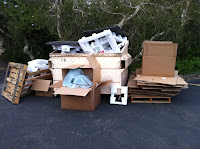
Poor Davey the Dumpster

Every action has a consequence. Sometimes you are the windshield, sometimes you are the bug. Sometimes you're the louisville slugger, sometimes you're the ball.

Sure, that ball went over the wall for us, with several palettes of Meyer Audio gear arriving on campus in the past month or so. But the action of receiving all that wonderful gear has a negative reaction. Let us all take a moment and show some sympathy to poor little Davey the Dumpster. Not only was he filled to the point of overflowing, he was surrounded! Foam, boxes, and palettes, oh my!


Many thanks for the hard work from Patricia, Stephen, and 101 students Sam and Dominic for getting all the items unpacked, and hauling the packaging down to the dumpster.

Tuesday, March 29, 2011

SIM Seminar - Day One

Today was the first of four days of SIM-3/System Design training here at UCI. There were many of people in the class this year - 16 total - including 7 from UCI: Jeff, Beth, Noelle, Patricia, Stephen, Tim and BC. We are honored to have Bob McCarthy here teaching the class and grateful to Mac Johnson of Meyer Sound for the opportunity.

Here are some photos: